

FullStory Left Non-Technical Teams Behind
Product-led teams need to see what broke, fast. Here’s the indie version worth building.



TL;DR
What changed at FullStory: It went from indie-friendly to enterprise-only. Base plans now start around $2K/year. Their target? $30,000+.
Who still needs this: Small SaaS teams (2–20 people) led by product, support, or marketing—not engineering. They want clarity, not configuration.
What to build: A focused, no-code-friendly session replay tool. Instant setup. Watch user friction. Zero fluff. Flat $25/mo.
What Opened the Door
FullStory used to be easy. One snippet, one dashboard. You could watch exactly how users broke your product. It was a lifesaver for indie teams flying blind.
But then came the upmarket climb. Today, FullStory starts at ~$2K/year for basic use. Median deal size? $27,504. And you won’t find pricing online, only “Contact Sales.” Oh, and buried in the fine print: a 60-day notice to cancel, or you auto-renew.
It’s not just cost. It’s bloat. Workforce analytics, SSO, data warehouse syncs. Stuff only IT teams at Fortune 500s care about. Small teams trying to debug a broken signup flow? They’re out of luck.
This evolution made sense for FullStory. But it screwed over the very teams that made it popular. The ones who just needed a window into user behavior. Fast, clear, honest.
That wedge is where a new tool fits.
Who Got Left Behind
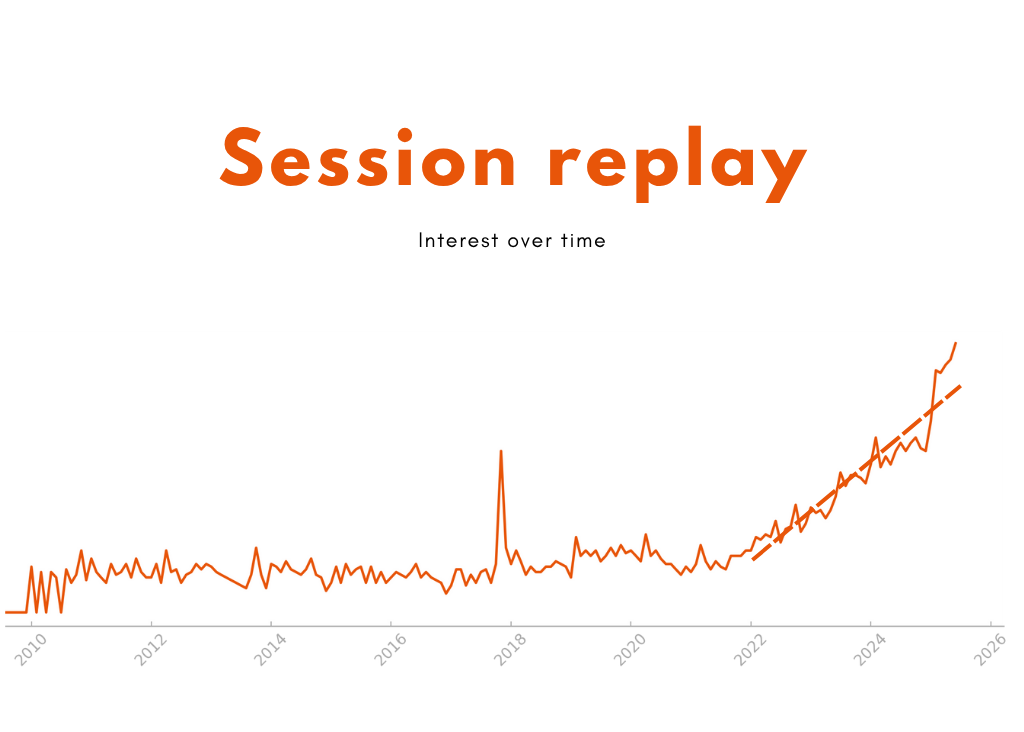
Session replay demand is growing—but non-technical teams are being ignored. These are 2–20 person SaaS or eCommerce teams led by product managers, marketers, and support leads. People who don’t want to “just spin up Kubernetes” to see why a form is broken.
They build in Webflow. Organize in Notion or Airtable. Automate with Zapier or Make. GA4 shows them pageviews, but when users drop off, they’re still guessing.
They’ve tried Clarity (too raw), PostHog (too technical), FullStory (too expensive).
They’re not looking for funnels, AI or enterprise features. They want to know:
Why are users bouncing on step two?
Where do support tickets really start?
What broke the form?
That’s it. But everything on the market tells them: “You’re too small to matter”
Where Indie Wins
You don’t need to beat FullStory at everything. Just build the version that actually works for non-technical teams:
Zero-config: Paste a script. Done.
Plain-English insights: “5 users rage-clicked at checkout.” Watch those sessions.
Flat pricing: $25/month. No usage anxiety.
Role-aware UI: Built for product/support, not SQL wizards.
Because truth is, most founders don’t need another analytics project. They need answers. Fast. Calm. Actionable.
If you ship this right, you don’t compete with FullStory, you replace it before it even enters the room.
How to Build an MVP
Core features to ship:
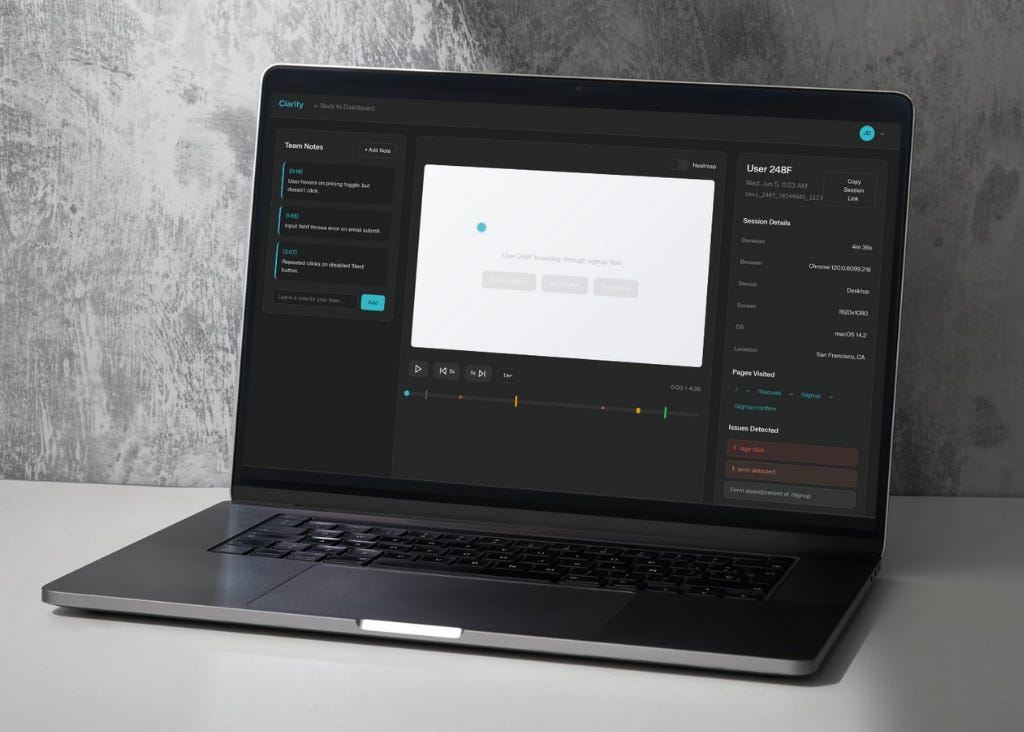
Session replay: Capture everything that matters: user scrolls, clicks, hovers, and input interactions. Replays should feel like a video with timeline controls but optimized for speed and clarity.
Issue tagging: It should automatically tag sessions where a user clicked repeatedly (rage click), hit a console error, or exited during form submission.
Basic filters: Let users slice and dice sessions by page URL, device type, browser, or flag (e.g., “only show sessions with errors on /signup”).
Notes & share links: Allow users to tag key timestamps with notes like “user confused here” or “button failed to load.” Make it one-click easy to share that session with a teammate via Slack, email, or public URL (no login or account creation required).
Dashboard Overview: Instead of overwhelming users with charts, show them what matters today: the number of new recordings, top flagged sessions, and most problematic pages.
For Developers:
Frontend: Next.js + Tailwind — Fast to build, looks sharp by default, deploys anywhere.
Recording: rrweb + compression worker (pako or lz-string) — Proven open-source library for capturing sessions with low overhead.
Backend: Supabase (Postgres + Auth) — No setup needed, great defaults, built-in auth, generous free tier.
Hosting: Vercel — Instant deploys, zero config, auto-preview on every push.
Auth: Clerk — Clean UI, built-in email/social login, easy to wire into Supabase.
Analytics: Umami — Lightweight, privacy-respecting usage tracking with no cookie banners.
For No-Coders / Light MVP:
Session replay: Start with OpenReplay Cloud. A powerful yet accessible session replay platform built with privacy, retention, and control in mind. Add their script to your site (Webflow, Carrd, or custom) and start capturing user sessions instantly. You’ll get heatmaps, rage-click detection, console errors, and timeline playback—all viewable in a clean UI. Unlike free options, you can white-label, tag users, and hold onto data longer.
Backend: Use Xano as your no-code backend. It gives you a scalable database (Postgres), logic builder, and API generator. All visual, with no setup required. You’ll use it to store session metadata (like rage-clicks or flagged sessions), team notes, user preferences, and more. Xano also lets you add business logic later. Like generating weekly reports, powering Slack alerts, or integrating feedback workflows, without ever leaving the no-code world.
Dashboard UI: Build your app interface with WeWeb, the most flexible front-end builder in no-code. It connects directly to Xano and lets you create polished, responsive dashboards. Build views like “Recent Sessions,” “Flagged Issues,” and “User Notes” with drag-and-drop logic. You can embed session playback, let users leave comments, and gate access to different views based on roles or plans. It feels like real SaaS because it is, just without the dev cost.
Automation & alerts: Set up your system logic using Make, a visual automation builder that connects all your tools. Use it to trigger workflows like: “when a session is flagged in OpenReplay, log it in Xano, send an email to the support lead, and post a summary to Slack.” It’s cost-effective, handles complex flows, and replaces both manual busywork and dev-built scripts.
User authentication & gating: Add user login, access control, and billing using Memberstack (great with WeWeb/Webflow) or Outseta (all-in-one SaaS backend). Either lets you create paid plans, manage users, and build gated dashboards—all without touching Stripe or OAuth setups. Ideal if you plan to sell this as a SaaS product with customer-facing views.
Builder Prompt Toolkit
UI Design Prompt:
Design a calm, minimal, and founder-friendly session replay tool built specifically for small SaaS teams and non-technical users. The primary goal is to help product managers, marketers, or support teams understand user friction quickly—without setup, clutter, or analytics jargon. The main layout should open to a “Dashboard” view that shows recent sessions in a clean list format. Each session row should include the user ID or anonymized label (e.g. “User A94F”), the visited page (URL or route), timestamp, browser icon, and one or more issue indicators like a red dot for rage clicks, a warning sign for JS errors, or a flag for form abandonment. This list should feel lightweight and scannable—like an inbox. Clicking any session opens a full-screen “Replay Viewer.” This viewer should include a video-style timeline with pause/play, skip forward/back, and a click marker scrub bar that shows where interaction spikes or problems occurred. Above the video, show a simple overlay heatmap or click trail. On the right side, display session metadata like browser, OS, device type, user location (city/country), and session length. Below that, include a “Notes” section where team members can leave timestamped comments (like “user gave up here” or “button didn’t load”). The UI should also include a top-level navigation bar with the following tabs: Dashboard, Sessions, Issues, and Settings. The “Issues” tab opens a filtered view of only problematic sessions, with filters like rage click, form dropout, or error. Filtering should be dead simple—small dropdowns or tags that say things like “Page = /checkout” or “Device = Mobile.” Don’t include any charts, dashboards, or analytics visualizations. Assume the user doesn’t want to set up funnels or events—they just want to see what’s breaking. For styling, imagine Notion meets Linear: lots of white space, clear font hierarchy, calm neutral colors (grays, whites, soft blues), subtle shadows, rounded buttons, and generous padding. It should feel soft, readable, and calming—never noisy or overwhelming. Prioritize usability on day one: every screen should work without onboarding. Assume the user is a solo founder or marketer, not a developer. No admin panels, roles, permissions, or integrations—just a clean experience focused on fast insight and low stress.
Landing Page Prompt:
Write a landing page for a session replay tool made for small SaaS teams who feel ignored by FullStory and overwhelmed by PostHog. Start with a sharp headline about clarity or control—like “Stop guessing where users get stuck.” Follow with a subheadline that promises instant answers, no setup, and one flat price. Add three fast benefit blocks (e.g., “Watch what went wrong,” “No events to tag,” “Built for lean teams”). Include a short backstory: explain that the tool was born from frustration with bloated platforms. Finish with an indie-style CTA like “Try the calm version” or “Get your first replay in 2 minutes,” paired with a minimal email signup.
Validation Email Prompt:
Write a short message to a solo founder or early-stage team. Keep it casual and builder-to-builder. Start with: “Hey! I’m building a lightweight FullStory alternative—just replay and alerts, no setup hell.” Mention that it’s designed for teams like theirs who aren’t technical but want to understand user behavior fast. Ask: “Are you using anything right now for session insight?” and offer to share a quick demo or screenshot. End with: “Happy to trade feedback if you're curious!”
Take Action Today
Post this line: “What’s your FullStory or PostHog bill right now? I’m testing a simpler replay tool—looking for early users.”
Spin up a mockup: Title: “Session Replay that Just Works.” One email field. Done.
Test real demand: Add Clarity to your own site. Watch 5 sessions. If you learn something new, you’re onto something.